
If your Bitcoin lives on an exchange, you do not really own Bitcoin. You own a polite IOU. The exchange promises to hand it over later, as long as it is still solvent, still online, and still in the mood to process withdrawals.
Self-custody is the grown-up version of that story. You hold the private keys yourself, so no company, government, or support ticket stands between you and your coins. Think bank balance versus cash in your pocket. Both can buy coffee. Only one works when the bank is closed.
This guide walks through what self-custody actually means, why people care so much about it, and how to move from “coins on an exchange” to “coins only I control” without needing a PhD in cryptography first.
What “self-custody” really means
Every Bitcoin wallet revolves around a private key: a long, unique secret that proves you own some coins and lets you move them. Whoever has that key controls the coins. That is the whole plot.
- Custodial: an exchange or app holds the private key for you. You see a balance in an account. You do not hold Bitcoin.
- Self-custodial (non-custodial): you hold the private key yourself, usually as a 12- or 24-word recovery phrase (a “seed phrase”). A self-custodial Bitcoin wallet is just a friendly interface for keys that live with you.
Self-custody does not mean you are abandoned in the wilderness. It means your safety net is math and backups you control, not a customer support queue that closes at 5pm.
Why it matters
Bitcoin’s big idea only works if you actually hold the keys: money that does not need permission, cannot easily be censored, and moves peer to peer. The phrase “not your keys, not your coins” stuck around because life keeps proving it true.
- Exchange failures. Platforms have frozen withdrawals, gone insolvent, or been hacked. Yesterday’s healthy-looking balance can become today’s locked screen.
- Account freezes. Custodial accounts get locked over compliance flags, disputed transfers, or policy changes, sometimes with no clear timeline for unlocking.
- Third-party risk, full stop. Even a well-run custodian is one company with one set of keys. If they get hacked, sued, regulated into a corner, or simply make a mistake, your coins feel it. You did not get a vote.
Exchanges are still useful for buying and selling. The point is simpler: Bitcoin you plan to hold, rather than actively trade, belongs in a wallet only you control.
The tradeoff: you become your own bank
Self-custody removes third-party risk and replaces it with personal responsibility. That is a real tradeoff, not a footnote you can skip.
- If you lose your seed phrase and your device, your coins are gone. There is no “forgot password” button, and no friendly chatbot that can invent one for you.
- If someone else gets your seed phrase, they get your coins. Instantly. Irreversibly. Awkward dinner conversation optional.
- You are responsible for backups, not a company’s data center.
That is not a reason to avoid self-custody. It is a reason to do it on purpose, with a backup plan you actually trust, instead of treating a seed phrase like the Wi-Fi password from 2014.
How to move to self-custody: step by step
- Choose a self-custodial wallet. Make sure the app generates and stores keys on your device, not on a server you do not control. Open-source wallets let anyone check that claim, which beats taking a company’s word for it.
- Create a new wallet and write down the seed phrase. Put it on paper (or steel, if you want fire and water to lose the fight). Never save it as a photo, a notes app entry, or anything that touches the internet. A screenshot of a seed phrase is a screenshot of your money.
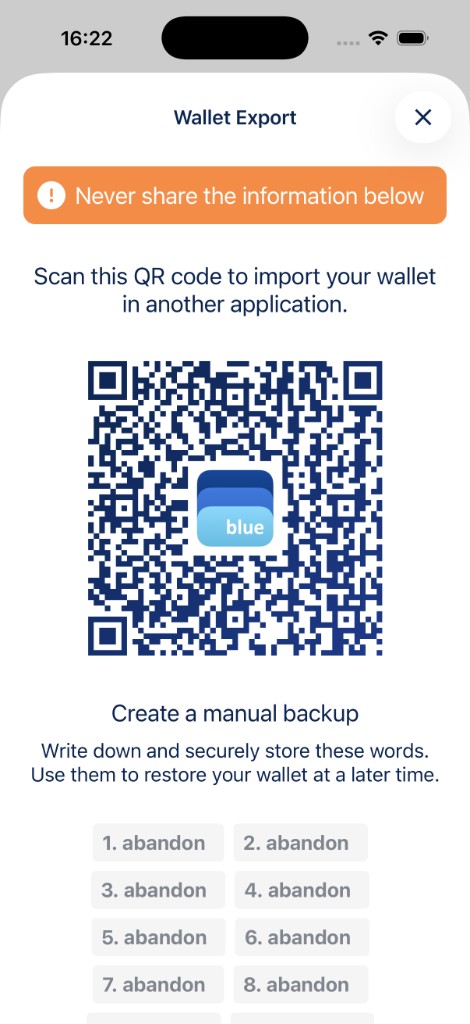
- Verify your backup before funding the wallet. Most good wallets ask you to confirm a few words from your phrase. Do that carefully. Finding a typo now is much nicer than finding it during a real recovery.
- Send a small test amount first. Move a little from your exchange to your new wallet address, confirm it arrives, then move larger amounts. Think of it as tasting the soup before serving the whole pot.
- Store the backup somewhere durable and separate from the device. A fireproof safe, a safe deposit box, or a trusted family member’s home works. The same drawer as your phone does not. See Backup and export a wallet for the full walkthrough.
- Consider splitting custody as your balance grows. For larger holdings, a multisig vault needs more than one key to move funds. That removes the “one lost seed phrase ruins everything” problem.
Common mistakes to avoid
- Storing your seed phrase digitally. Cloud notes, email drafts, password managers, photos. If it can be reached over the internet, someone else can reach it too.
- Typing your seed phrase into a website. No legitimate wallet will ever ask for it through a web form. This is the classic phishing move in Bitcoin, and it still works on people who should know better (including future-you on a sleepy Tuesday).
- Treating a hot wallet on your everyday phone as long-term savings. A mobile wallet is great for spending and day-to-day use. Larger, long-term holdings deserve an offline/cold storage setup or a multisig vault.
- No backup at all, or only one copy in one place. A single point of failure for your keys is exactly what self-custody was supposed to fix.
Self-custody isn’t all-or-nothing
You do not need to move everything tonight, and you do not need to choose between “convenient hot wallet” and “bunker-grade cold storage.” Most people do better with layers:
- A small, spendable amount in a mobile wallet for everyday use (including Lightning, for fast, low-fee payments).
- Larger savings in an offline or watch-only setup, where keys never touch an internet-connected device.
- For meaningful holdings, a multisig vault, so no single lost or stolen key can move your coins.
Self-custody is less a one-time decision and more a set of habits. Verify your backups. Keep keys offline when you can. And do not let convenience quietly turn into risk.
Related reading: Bitcoin Wallet for iOS and Android · Create a Bitcoin wallet · Backup and export a wallet · Multisig Vault