
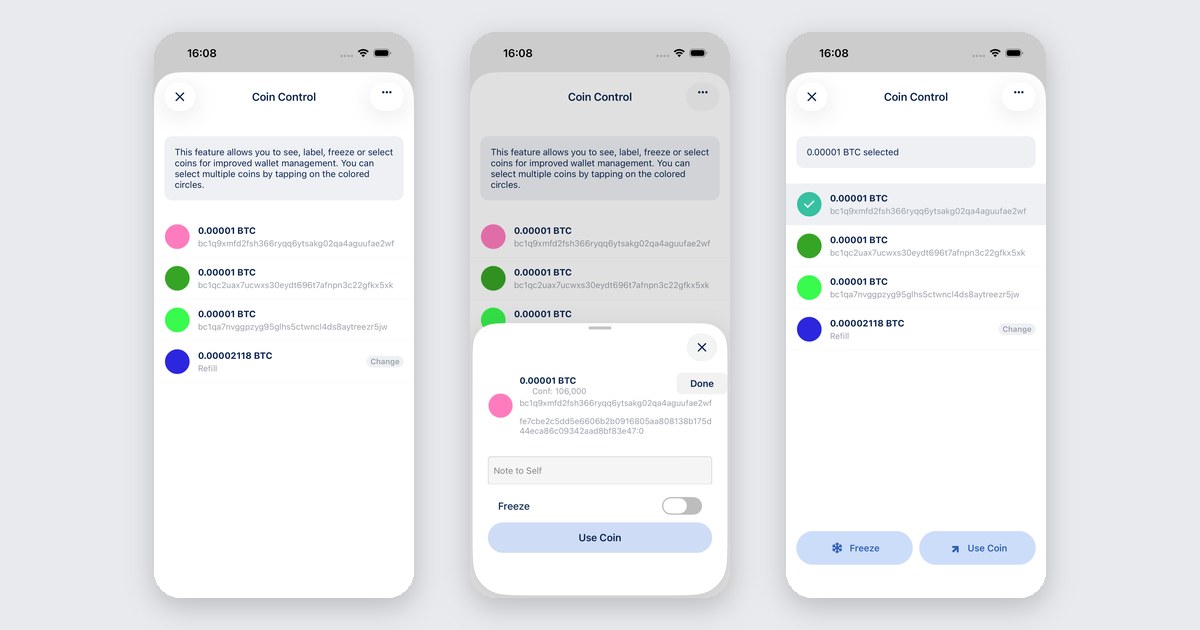
A bitcoin wallet does not hold one balance. It holds coins. Every payment you ever received is its own output, with its own history, sitting next to the others.
When you send, the wallet picks some of those coins to pay. Most of the time that is fine. Sometimes it is not: the coin from an exchange you would rather not mix with the coin from a friend, the dust that costs more in fees than it is worth, the stack you meant to leave alone.
This post does one job: label your coins, freeze the ones that should stay put, and choose exactly which coins pay for a send. The full reference for the screen lives in the docs: Coin control: select and manage coins.
What you need
- BlueWallet with an on-chain Bitcoin wallet that already has coins. Official builds on the download page.
- A few minutes to remember where each coin came from. That memory is the whole value of a label.
Open your coins
Open the wallet. Tap the wallet menu, then Wallet details. Scroll to Coins and tap it.
You land on a list of every spendable coin in the wallet. Each row shows the amount, the address or label, and badges for change and frozen outputs.
You can reach the same list from the send screen too. Open the menu there and choose Coin control.
Label a coin
Tap a coin row, not the colored circle. The detail sheet opens.
Add a label. Write where the coin came from, in words future you will understand: “salary March”, “bought from Ana”, “change from the hardware shop”. Short and honest beats clever.
Freeze a coin
In the same detail sheet, switch on the Freeze toggle.
A frozen coin stays in the wallet and still counts as yours. BlueWallet just skips it when it builds a transaction. Nothing gets spent from it by accident, and it never gets merged into a payment you did not plan.
Freeze the coins you want kept apart: a stack you are saving, an output you do not want linked to your everyday spending, dust that would cost more to move than it holds. Switch the toggle off when you change your mind.
Choose which coins pay
Back on the list, tap the colored circle on one or more coins. They highlight, and a bar appears at the bottom with Freeze, Unfreeze and Use coins.
Tap Use coin (or Use coins if you picked more than one). The send screen opens with only those coins selected, and a blue Coins selected banner confirms it. Enter the address and amount, pick the fee, confirm.
Tap the banner to go back and change the pick. Tap the × to clear it and let BlueWallet choose automatically again.
A frozen coin can still pay if you select it on purpose. Freezing protects you from accidents, not from yourself.
Common mistakes
- Leaving every coin unlabeled. In a month, “0.0031” means nothing. Label when the coin arrives, while you still know.
- Spending a coin you meant to keep apart. If a coin should not mix with the rest, freeze it now, before the next send.
- Forgetting about change. When a coin is bigger than the payment, the rest comes back to you as a new change coin. Label that one too.
- Treating freeze as security. A frozen coin is still on a hot phone. Freeze is about choosing what you spend, not about protecting the keys.
When not to use this
If the wallet holds one or two coins and you do not care which one pays, let BlueWallet choose. Automatic selection is fine for everyday spending.
If the stack is too big to keep on a phone at all, the keys belong somewhere else. Keep them on a device and use BlueWallet as watch-only: How to sign with a hardware wallet in BlueWallet and How to set up a watch-only wallet in BlueWallet.
If spending should take more than one key, that is a Vault.
Related reading: Coin control: select and manage coins · How to set up a watch-only wallet in BlueWallet · How to sign with a hardware wallet in BlueWallet · How to create a multisig vault in BlueWallet