Tap any on-chain transaction in a wallet to open its status screen. This view shows how much moved, whether the payment is still pending or already confirmed, and the technical details behind the transaction.
Open a transaction
From your wallet’s transaction list, tap a row to open its status screen. The header shows the direction, Sent or Received, and the date and time.
Amount and status
At the top you see the transaction amount in Bitcoin (or your chosen unit) and the fiat equivalent below it.
The colored status card summarizes what happened:
- Received (green), bitcoin arrived in this wallet.
- Sent (red), bitcoin left this wallet.
- Pending (blue), the transaction is still waiting for confirmations. You may see Speed Up or Cancel options for unconfirmed sends.
For confirmed on-chain transactions, the card also shows how many confirmations the payment has (for example, 6+ confirmations once it is well settled on the network).
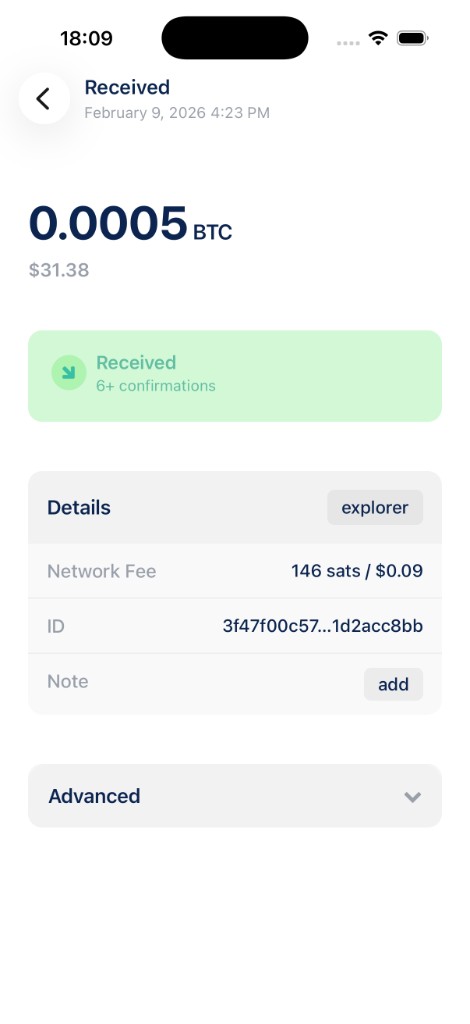
Details
The Details section includes:
- explorer: open the transaction in your preferred block explorer.
- Network Fee: the mining fee paid for the transaction, in sats and local currency.
- ID: the transaction hash. Tap to copy the full value.
- Note: add a private memo to help you remember what the payment was for. Notes are searchable from Manage Wallets.
Sent transactions with a single external recipient also show a To address in this section.
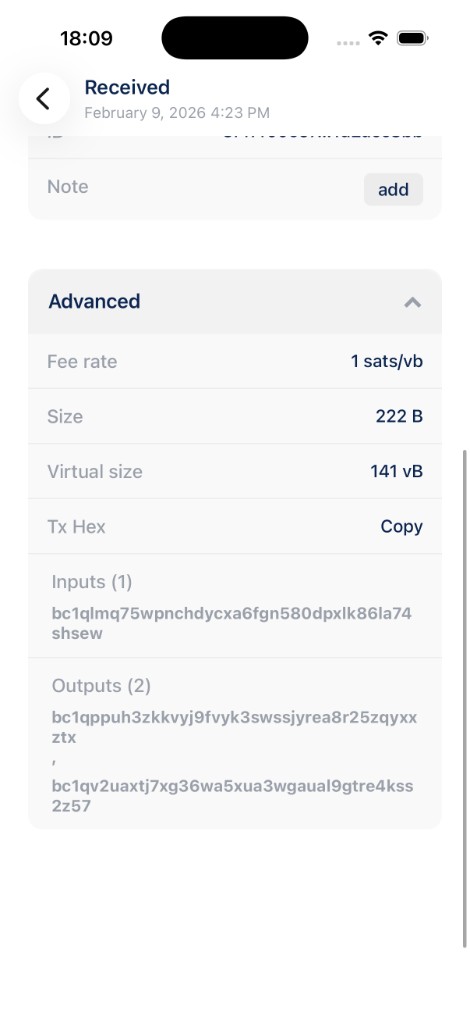
Advanced
Tap Advanced to expand low-level information about the transaction:
- Fee rate: fee per virtual byte (sats/vB).
- Size and Virtual size: raw and weight-adjusted transaction size.
- Tx Hex: the raw transaction data (tap Copy to copy it).
- Inputs and Outputs: the addresses that funded the transaction and where the bitcoin went.
Tips
- Confirmations increase as new blocks are mined on top of the transaction. Most recipients consider a payment final after several confirmations.
- Pending sent transactions can sometimes be sped up (RBF) or cancelled while they are still unconfirmed, see Pending transactions for details.
- Lightning transactions use a different detail screen; this guide applies to on-chain Bitcoin wallets.