
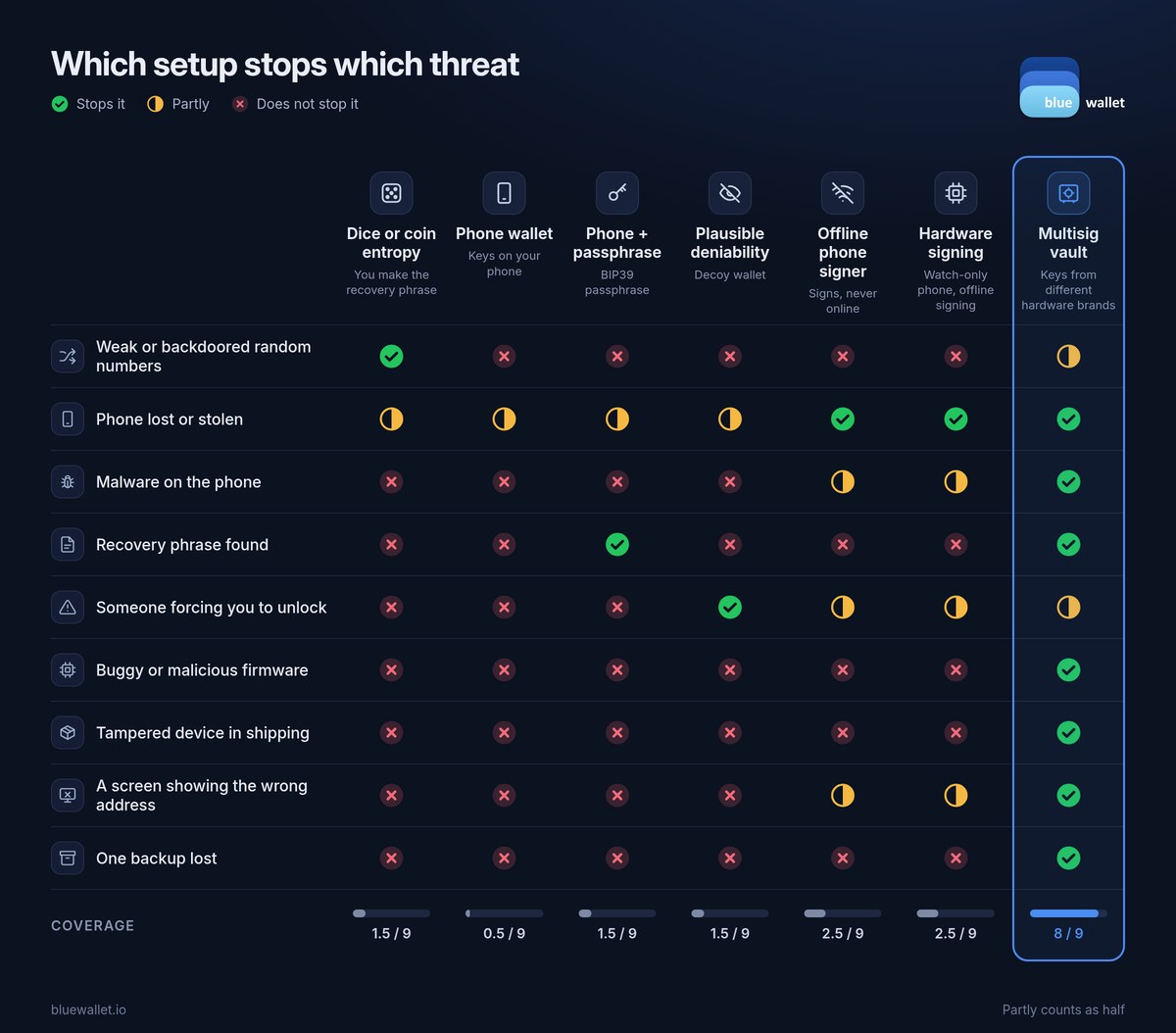
Security is a question with two halves: what are you protecting against, and what does each tool actually stop? BlueWallet gives you six setups. Each one closes different doors. This guide is a simple threat model: it maps each setup to the attacks it stops, so you can pick the ones that match the risks you really face. For the full list of what the app does, see Features.
In the table above, a half mark means the setup helps, but leaves a gap you need to cover another way.
The setups
Dice or coin entropy. With dice roll entropy, you make the randomness behind your recovery phrase yourself, with a 6-sided die, a 20-sided die or coin flips. Turn on Advanced mode, then pick manual entropy on the add wallet screen. See Manual entropy.
Phone wallet. The keys live in BlueWallet on your phone, protected by your device lock and, if you switch it on, BlueWallet’s own password.
Phone wallet plus a passphrase. A BIP39 passphrase is an extra word you choose. The same recovery words with a different passphrase open a completely different wallet. See Import a wallet with a passphrase.
Plausible deniability. A second, fully separate encrypted storage with its own password. Under pressure, you open the decoy while your main wallets stay hidden. See Plausible deniability.
Hardware wallet signing. Your phone holds a watch-only wallet. The keys stay on a separate device that signs offline. See How to sign with a hardware wallet in BlueWallet.
Offline phone signer. The same idea with a spare phone. Install BlueWallet on an old phone, put it in airplane mode for good, and keep the keys there. Your everyday phone holds a watch-only wallet and builds the payment. The offline phone signs it by QR code, and the everyday phone broadcasts it. It’s a cheaper take on hardware signing, not a stronger one, because a hardware wallet is built for signing and nothing else. See Sign a transaction offline.
Multisig vault. A wallet that needs several keys to spend, 2 of 3 by default. Put each key on a hardware wallet from a different brand, in a different place. See Multisig vault and How to create a multisig vault in BlueWallet.
The threats
Weak or backdoored random numbers
If the random number generator in a phone, a device or an app is flawed, the keys it makes can be guessed. Dice or coin entropy takes that trust away: you supply the randomness. Give it the full 256 bits, because BlueWallet fills any missing bits from the system generator. A multisig vault limits the damage to one key, as long as the other keys came from other sources.
Phone lost or stolen
A phone wallet is only as strong as its lock, so switch on BlueWallet’s password. With hardware signing, an offline phone signer or a vault, your everyday phone holds no keys at all. Whoever has it can see your balance, and that is all.
Malware on the phone
Malware that reaches a phone wallet can reach its keys. Hardware signing and an offline phone signer keep keys off the everyday phone, but malware could still swap the address you send to, so confirm it on the signing device. A vault asks more than one device to agree before coins move.
Recovery phrase found
Anyone who finds your words owns a plain wallet. With a passphrase, the words alone open an empty wallet. Store the passphrase apart from the words. In a 2 of 3 vault, one phrase is short of the quorum.
Someone forcing you to unlock
Plausible deniability was built for this. You open the decoy storage, with a small believable balance, and your main wallets stay encrypted. A hardware wallet or a vault with keys in different places adds friction, but a determined attacker can still push for more.
Buggy or malicious firmware
A single signing device is a single point of trust. A vault with keys from different brands means one bad firmware sits below the quorum.
Tampered device in shipping
The same logic: one implanted device cannot spend from a multisig vault on its own.
A screen showing the wrong address
Check every address on the signing device, never only on the phone. With one device, you trust one screen. With a vault, more than one device shows you the payment before it is signed.
One backup lost
Lose the only backup of a single-key wallet together with the device, and the coins are gone. A 2 of 3 vault recovers with any two keys plus the vault backup file, so keep that file safe too.
Pick your layers
The setups stack. Dice entropy can make the keys for a hardware wallet or a vault. A passphrase can protect any single-key wallet. Plausible deniability guards the app itself. Start with the threats you actually face, then add one layer at a time, and back up every key before you rely on it. See Back up your wallet.
Related reading: How to sign with a hardware wallet in BlueWallet, How to create a multisig vault in BlueWallet, Plausible deniability.